


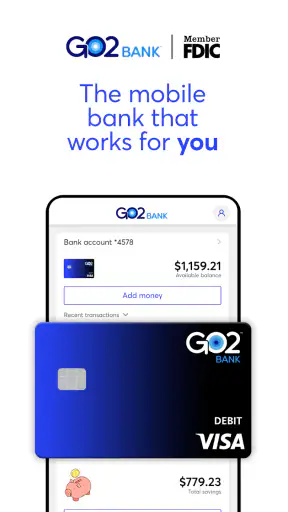
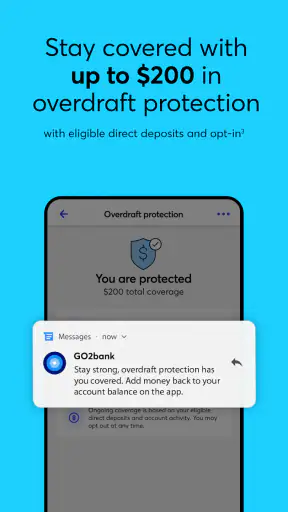
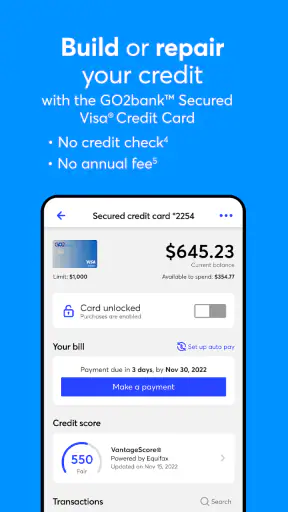

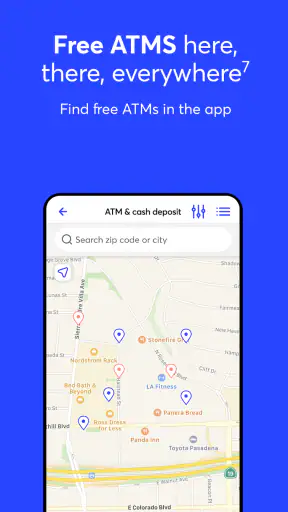
GO2bank: Mobile banking is a finance app from Green Dot that I see as most useful when the main job is keeping everyday banking close at hand. Its appeal is not that it tries to replace every financial tool on your phone. Instead, it focuses on the practical idea of a mobile bank account that you can check and manage without depending on a branch visit. That makes it especially interesting for people who want a simpler way to handle routine money tasks.
I spent time looking at it from that angle: not as a complete financial planning system, but as a daily control panel for banking. The experience is built around convenience, yet convenience only matters if the app helps you make decisions quickly and avoid small mistakes. In my view, that is where GO2bank is easiest to understand. It can reduce the distance between “I need to check my money” and actually checking it, but it is not automatically the best fit for every banking situation.
Why mobile access is the central strength
The most important capability here is the ability to treat your phone as the primary place for routine banking. That sounds simple, but it changes the rhythm of managing money. Instead of waiting until you are near a bank or opening a full desktop banking session, you can make checking your account part of ordinary moments: before buying groceries, after a payment, or while planning the rest of the week.
GO2bank is free to download, and the app has built a substantial audience, with more than five million installs and an average rating of 4.4 from roughly one hundred five thousand ratings. Those figures do not prove that every user will enjoy it, but they do suggest that the mobile-first approach has broad appeal. I also like that its content rating is Everyone, which keeps the product positioned as a straightforward finance tool rather than something aimed at a narrow age group.
Green Dot develops the app, and the current version is 3.2.0. It supports Android 9 and later, so compatibility is worth checking before installation if you use an older phone. The app was released on November 10, 2020, giving it enough history to feel like an established product rather than a brand-new experiment.
The practical benefit of mobile banking is not just speed. It is visibility. When an account is easy to open and check, I am more likely to notice a balance change while it is still relevant. That can help with small but important choices, such as deciding whether a nonessential purchase should wait or whether a scheduled payment will leave enough money available.
The real advantage is reducing the effort required to stay aware of your money. A banking app does not improve a budget by itself, but it can make the information needed for better decisions easier to reach. For someone who tends to avoid financial admin because it feels inconvenient, that lower friction may matter more than a long list of advanced tools.
What using it feels like in a normal week
In everyday use, I would approach GO2bank in short sessions rather than treating it like a monthly financial review. I would check the account before a larger purchase, look again after a transaction, and use that information to keep the rest of the week realistic. This quick-check habit is where a mobile bank can be more useful than a traditional setup that I only remember when something goes wrong.
A realistic example would be a payday routine. I might open the app in the morning, confirm that the available balance looks right, and then separate essential spending from flexible spending in my own notes or budget. Later, before paying for an unexpected repair, I could check the account again instead of relying on memory. The app’s value in that situation is not financial advice; it is giving me a current point of reference at the exact moment I need one.
That workflow also reveals an important limitation: the app cannot make a weak money routine disappear. If I only open it after spending, I am still reacting rather than planning. I would get more from it by deciding on two or three regular check-in moments and keeping those moments brief. The goal is not to stare at the balance repeatedly, but to make account awareness a normal habit.
One useful tip is to treat the balance as a checkpoint, not as permission to spend. The amount visible in a banking app may not reflect every future obligation or personal commitment. I would still keep a separate list of upcoming bills and planned expenses. GO2bank can show me where I stand, but I remain responsible for interpreting that number in context.
Another practical insight is that mobile access can help with “pause decisions.” If I am about to make an impulse purchase, opening the app first creates a small break between wanting something and paying for it. That pause is easy to overlook, but it can be more valuable than a decorative budgeting feature because it happens at the point of decision.
The best fit: simple, frequent account control
I think GO2bank makes the most sense for someone who wants a dedicated mobile banking experience for everyday money and values quick access over a complicated financial dashboard. It could suit a person who is comfortable doing most banking from a phone, wants to monitor spending more consistently, and does not want to organize their finances around branch visits.
It is also a reasonable option for someone building a basic money routine. A new user can begin with a simple pattern: check the balance before discretionary spending, review recent activity after important payments, and make a weekly note of what remains for essentials. That process does not require advanced financial knowledge, and the app’s straightforward purpose makes it easier to focus on the habit itself.
For a household, the usefulness depends on how responsibilities are divided. If one person handles the account, mobile access can make that task easier to fit into a busy day. If several people need a shared view of finances, the app alone may not solve the communication problem. I would still use a shared budget or written plan so that account access and household planning do not become confused with each other.
There is also a good use case for people who want a separate place for routine spending. Keeping everyday funds distinct from long-term savings or investment accounts can make spending boundaries easier to understand. I would not assume the app replaces those other financial products, but its mobile banking role can work well as one part of a broader setup.
The strongest scenario is therefore quite specific: you want to check and manage ordinary banking activity from your phone, and you are willing to build a habit around that access. If your main need is investment research, detailed tax planning, complex household accounting, or in-depth credit analysis, I would look for a specialized service instead of expecting this app to cover everything.
Where the convenience comes with tradeoffs
The first tradeoff is concentration. When banking lives primarily on a phone, the phone becomes an important gateway to financial information. I would use a strong device lock, keep the operating system updated, and avoid treating an unlocked phone as a safe place to leave the app open. These are sensible precautions for any mobile banking product, but they matter especially when the phone is the main access point.
The second tradeoff is that a clean mobile experience can encourage oversimplification. Seeing an available balance is useful, but it is not the same as understanding cash flow. I would not use GO2bank as my only record of future bills, irregular expenses, or longer-term goals. A separate budget can fill that gap, while the app handles the immediate account check.
There is also a difference between convenience and completeness. Traditional banks may offer a wider range of services, stronger in-person support, or a more familiar relationship for customers with complicated needs. A mobile-first option can be faster for routine actions, but a person who regularly needs specialist help may prefer a bank with more channels and broader financial products.
Another point I would consider before switching is how well the app fits my existing money ecosystem. If I already rely on several accounts, automatic transfers, external budgeting tools, or a particular payment routine, moving one part of that system can create extra tracking work. The right question is not simply “Is mobile banking convenient?” but “Will this app make my whole routine simpler?”
I would also avoid choosing it solely because it is free. The absence of a download price is helpful, but banking decisions should be based on the complete account experience and the terms that apply to the services I plan to use. Before making it my main account, I would read the current account details carefully and confirm that the available functions match my needs.
These limitations do not cancel out the app’s value. They define its boundaries. GO2bank is strongest when I use it as an accessible daily banking tool, not when I ask it to become a complete financial adviser, a full budgeting suite, or a replacement for every traditional banking relationship.
Small habits that make the app more useful
The first habit I recommend is a “before and after” check for important spending. I would look at the account before a significant purchase, then check again once the transaction should appear. This gives me a clearer sense of how activity affects the balance and helps me notice when my mental estimate was wrong. It is a simple workflow, but it turns mobile access into a feedback loop rather than passive information.
The second is to use a weekly review with a fixed purpose. I would not open the app without knowing what I am checking. Instead, I would review the current balance, recent activity, and the amount I expect to need before the next income or payment milestone. Keeping the review focused makes it less likely that I confuse account checking with a full budget review.
The third is to separate “available now” from “safe to spend.” I would write down upcoming essentials outside the app and subtract them mentally or in a separate note. This is particularly useful for people whose income arrives in larger intervals, because a healthy-looking balance can still be committed to future bills.
A fourth insight is psychological: the app can make financial avoidance harder. If I know that checking the account takes only a moment, I have fewer excuses to postpone it. That can be valuable for users who do not need complex tools but do need a reliable prompt to look at their money. The benefit comes from consistency, not from opening the app dozens of times a day.
Who should choose it, and who should look elsewhere
I would recommend considering GO2bank if you want mobile banking to be the center of your everyday account routine, prefer quick balance awareness, and are comfortable handling most tasks digitally. It is particularly appealing to someone who wants a clear, accessible starting point rather than a crowded financial platform.
I would be more cautious if you need extensive financial planning, complicated account coordination, or frequent personal assistance. In those cases, a full-service bank or a dedicated budgeting and investment app may be a better companion or replacement. The decision depends less on the app’s popularity than on whether its focused mobile approach matches the way you actually manage money.
People who are new to banking should also remember that an easy interface does not remove the need to understand account terms, payment timing, and personal obligations. I would take time to learn the account rules before depending on it for essential payments. That is not a criticism unique to this product; it is the basic responsibility that comes with choosing any banking service.
For existing bank customers, the strongest reason to try it would be a specific problem: perhaps you want faster daily access, a simpler spending account, or a more convenient way to monitor routine activity. I would not move everything immediately just because a mobile app looks easy. I would first test whether the workflow genuinely reduces effort and whether it fits with the rest of my finances.
My final view after using the mobile-first approach
GO2bank: Mobile banking succeeds when I judge it by its central promise: making ordinary banking easier to reach from a phone. Green Dot has created an app with broad appeal, a free entry point, and a clear role in the finance category. Its strong install base and 4.4 average rating show that many people find this approach useful, while the Everyone age rating keeps it approachable for a wide audience.
My honest view is that its best feature is not a flashy extra. It is the way mobile access can turn account awareness into a small daily habit. That can help me make more deliberate spending choices, catch surprises sooner, and feel less disconnected from routine banking.
At the same time, I would not mistake convenience for a complete financial system. I would pair the app with a separate plan for bills, savings, and longer-term goals, and I would choose a different solution if I needed specialist support or a broader range of financial services. For the right user, though, GO2bank offers a practical center for everyday money management.
If your priority is simple, frequent control of a mobile bank account, this is an app I would seriously consider. If your finances are complex or you want one platform to explain every part of your financial life, I would keep looking. The app is most valuable when its focused design matches your needs instead of being asked to do a job it was never meant to handle.


